
QCNV TECHNICAL GUIDE
Night Vision Technology Guide
Understand how night vision works, explore key specifications, compare device options, and learn how to care for your equipment. A practical guide for distributors, integrators, and professional buyers.
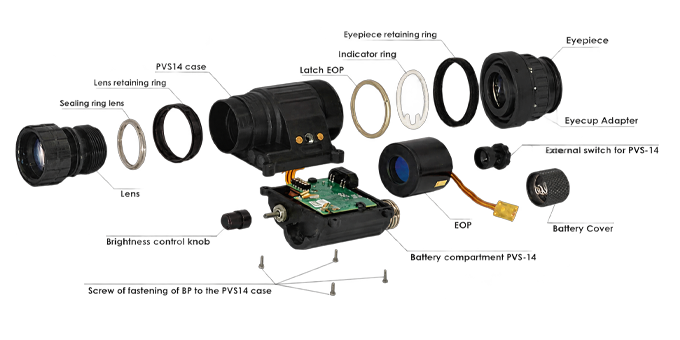
How Night Vision Works
Image-intensified night vision uses available light to reveal a scene in low-light conditions. The objective lens gathers light and focuses it onto an image intensifier tube, which converts and amplifies the signal to produce a visible image.

The Role of the Image Intensifier Tube
At the heart of Gen 2+ and Gen 3 night vision is an image intensifier tube. Its main imaging stages convert incoming light into electrons, multiply those electrons, and convert them back into visible light.
- 01Photocathode
- Converts incoming photons into electrons, preserving the spatial information of the scene.
- 02Microchannel Plate (MCP)
- Multiplies electrons through microscopic channels to amplify the electron image.
- 03Phosphor Screen
- Converts the amplified electron image into visible light for viewing through the eyepiece.
From Available Light to a Visible Image
-
Collect Light
The objective lens gathers available light from the scene and focuses it onto the tube's photocathode.
-
Convert to Electrons
The photocathode releases electrons in response to incoming photons, forming an electron image.
-
Multiply Electrons
The microchannel plate multiplies the electrons while retaining the spatial pattern of the image.
-
View the Image
The phosphor screen emits visible light when struck by electrons. The eyepiece lets the user view this image.
Available light matters. Image intensification needs incoming light. When ambient light is insufficient, a compatible infrared illuminator can provide additional illumination. Image quality also depends on the tube, optics, and viewing conditions.
Image Intensification vs Thermal Imaging
Uses available visible and near-infrared light within the tube's spectral response to reveal the scene. Performance depends on illumination as well as the tube and optical system.
Detects thermal infrared radiation to form an image of thermal contrast. It does not require visible illumination and uses a different detector system from an image intensifier tube.
Night Vision Specs Explained
A specification sheet helps you compare image intensifier tubes, but no single number describes the complete viewing experience. Start with the key parameters, then check units, test conditions, and the report for the individual tube.
FOM
Figure of MeritCombines resolution and signal-to-noise ratio into a single comparison figure.
How to interpret it
FOM = resolution in lp/mm × SNR. Compare both underlying values: tubes with similar FOM can have different noise and detail characteristics. FOM does not include gain, EBI, halo, or blemishes.
SNR
Signal-to-Noise RatioDescribes signal relative to noise under defined test conditions.
How to interpret it
Higher SNR generally supports cleaner low-light detail when other conditions are comparable. Check the measurement conditions rather than comparing numbers from different test methods directly.
Resolution
Limiting resolution · lp/mmDescribes the ability to distinguish closely spaced light and dark lines.
How to interpret it
Confirm whether the value refers to center or edge resolution and how it was tested. Tube resolution is not the same as complete-system resolution, which also depends on the optics.
Gain
Luminance amplificationRelates output luminance to input illumination under the specified measurement conditions.
How to interpret it
Match units and input illumination before comparing gain. Higher gain alone does not guarantee better detail. Luminance gain and maximum output brightness are separate measurements.
EBI
Equivalent Background IlluminationExpresses the tube's background output as an equivalent input illumination.
How to interpret it
Lower EBI generally means less background glow at the same temperature and test conditions. Ask for the value, units, and test temperature when this parameter is important to your application.
Halo
Bright-source halo sizeDescribes the halo around a bright point source under defined test conditions.
How to interpret it
A smaller measured halo indicates a more confined halo under the same test setup. Confirm the measurement method, source conditions, and units before comparing tubes.
How to Read an Image Intensifier Tube Report
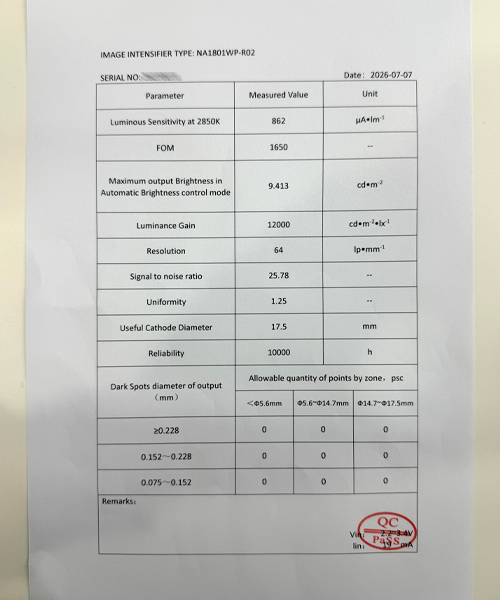
This photographed report provides a practical reading example. Its values apply to the tube documented here and are not specifications for every QCNV configuration.
-
Confirm the tube identity
Check the image intensifier type, serial number, and report date. Match the original serial number to the supplied tube; the serial number in this photograph is obscured.
-
Read the value together with its unit
The columns identify the parameter, measured value, and unit. Keep the test condition attached to the value: the sensitivity row, for example, specifies 2850 K.
-
Cross-check FOM using resolution and SNR
The report lists resolution of 64 lp/mm and SNR of 25.78. Their product is consistent with the displayed FOM after rounding.
64 × 25.78 = 1,649.92 ≈ 1,650 -
Check the meaning of the dark-spot table
Read spot diameter and image zone together. This report labels the columns “Allowable quantity of points by zone.” Confirm whether entries are acceptance limits or inspection results; zeros alone do not establish a measured blemish-free image.
-
Confirm missing values and definitions
EBI and halo are not shown. The “Reliability” row lists 10,000 h, but its definition and test basis need confirmation before interpreting it as tube life. Review supporting inspection records alongside the QC stamp.
| Report field | Displayed value | What to check |
|---|---|---|
| Luminous Sensitivity at 2850K | 862 µA/lm | Retain the stated light-source condition when comparing sensitivity. |
| FOM | 1,650 | Read alongside resolution and SNR. |
| Maximum output Brightness in Automatic Brightness control mode | 9.413 cd/m² | Output luminance in the stated mode; not the gain value. |
| Luminance Gain | 12,000 cd·m⁻²·lx⁻¹ | Match units and measurement conditions. |
| Resolution | 64 lp/mm | Confirm test method and measurement location. |
| Signal to noise ratio | 25.78 | Confirm the illumination and measurement method. |
| Uniformity | 1.25 | Request the ratio definition and acceptance criterion. |
| Useful Cathode Diameter | 17.5 mm | Active cathode diameter, not the outside housing diameter. |
| Reliability | 10,000 h | Confirm definition and test basis; do not equate this directly with warranty or guaranteed service life. |
| EBI / Halo | — Not listed | Request supplementary data if required. |
Other Tube Specifications
- Photocathode sensitivity: compare the stated source spectrum or wavelength as well as the value.
- Phosphor type: confirm green or white phosphor from the configuration documentation; color alone is not a performance grade.
- Auto-gating: verify it separately. An automatic brightness control entry does not by itself confirm auto-gating.
- Blemish criteria: confirm permitted spot sizes, zone boundaries, and the actual inspection result.
System Specifications
- Field of view and magnification: check the specifications of the assembled device.
- Focus and diopter range: confirm adjustment ranges for the selected optical configuration.
- Weight: check whether batteries, mounts, and accessories are included.
- Power and runtime: compare battery type, test conditions, and accessory use.